
 Español
 Français
 Deutsch
 Italiano
 Português
 Mega Packs
 Arcade Cabinet Kits
 Vinyls
 Monitors
 Arcade Stools
 Arcade Components
 T-Molding and U-Molding
 Gaming furniture
 Outlet
Arcade
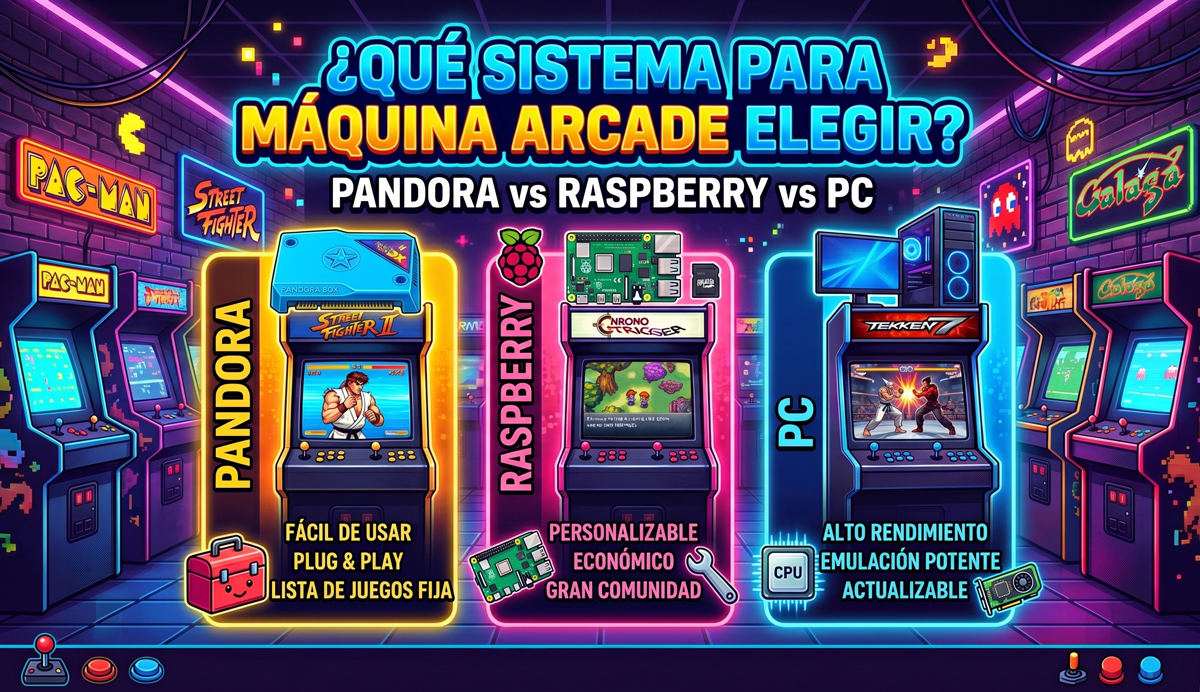
What System to Choose for Your Arcade Machine? Pandora vs Raspberry vs PC
May
Fulfilling the dream of having an arcade cabinet at home is an incredible journey. Designing the cabinet, choosing the vinyl artwork, buying the coloured buttons… But before you tighten the first screw, there is a crucial question that will determine the fate of your project: What system for arcade machine are you going to choose as the heart of your cabinet?
Today, the market offers three very different candidates: Pandora’s Box, Raspberry Pi and PC (either tower or Mini PC). Each has a different gaming philosophy, different costs and a user experience ranging from “plug and play” to advanced technical configuration.
In this article we analyse each system for arcade machine in depth, detailing its advantages, disadvantages and which one you should choose according to your budget so you don’t waste money. At the end we also explain how the buttons are connected in each case and which OmniRetro pack fits each one.
1. Pandora’s Box: The Plug & Play style system for arcade machine
The Pandora’s Box is a closed system (an integrated board inside a cartridge or the commercial controllers themselves) that comes with thousands of pre-installed classic games. It is designed for those seeking maximum convenience.
🟢 Advantages of the Pandora Box
- Zero technical complications: It is the only system that does not require fighting with emulators, downloading ROMs or mapping buttons. Take it out of the box, connect cables and play.
- Economical and direct: For the cost of a single commercial board you have the whole ecosystem covered. Ideal for tight budgets.
- CRT fidelity: Most models have native CGA/VGA video outputs, making it easy to connect to old tube monitors.
If you want to go this way without hunting for parts one by one, we have packs with multigame board (the cabinet with the board, joysticks, buttons and all the wiring) and packs with Pandora panel, where the control panel comes already assembled with its board.
🔴 Disadvantages of the Pandora Box
- No customisation: Adding new titles is a headache or directly impossible. If your childhood game is not there from the factory, you are left without it.
- Inflated catalogue: They promise thousands of games, but the reality is that there are plenty of modified clones, hacked versions or the same title repeated by regions.
- Very tight power: Designed for classic 2D systems. Forget about smoothly emulating demanding 3D games like Dreamcast or PlayStation 2.
2. Raspberry Pi: The perfect balance and the king of emulation
If you are looking for a versatile and economical system for arcade machine, the Raspberry Pi is the undisputed queen. This microcomputer the size of a credit card transforms into a multi-console monster by installing systems like Batocera or Recalbox. If you are torn between them, our guide to the best arcade emulation systems compares them one by one.
🟢 Advantages of the Raspberry Pi
- Gigantic community: It is very easy to find solutions to controller or audio faults, as well as “pre-cooked” images by users with game collections already ready.
- Absolute customisation: Allows you to change the visual theme of the menus, add automatic covers, organise favourites and save game whenever you want.
- Minimal consumption and space: It consumes a ridiculous amount of energy and fits hidden in any corner of an arcade bartop cabinet.
🔴 Disadvantages of the Raspberry Pi
- Mandatory learning curve: Requires formatting a MicroSD, burning the operating system from a computer, passing games over the local network and manually mapping the controls.
- 3D power ceiling: Although Raspberry Pi 4 and Pi 5 fly with 80s and 90s systems, they still show stuttering in heavy 3D games from the 2000s.
3. PC (Computer or Mini PC): Raw power without limits
This option consists of recycling a computer, building a dedicated tower or — the most recommended option today — using a Mini PC (such as bqbox or Ryzen Mini processors). Performance and software possibilities change depending on the approach you choose.
🟢 Advantages of building a PC
- Unlimited power: It can handle everything. From the original Pac-Man to PlayStation 3, Nintendo Switch and modern 3D fighting games like Tekken 7 or Street Fighter 6.
- Extreme visual quality: Supports heavy graphic filters (advanced CRT shaders), 4K resolutions and offers the lowest possible input lag.
- Mini PCs to the rescue: Using Mini PCs completely solves the historical problems of space and noise inside the arcade cabinet, offering massive power in the size of a book.
🔴 Disadvantages of building a PC
- The cost of entry: It is still the most expensive alternative if you have to acquire the hardware from scratch, especially if you are looking for components with dedicated graphics for modern 3D systems.
- Higher power consumption: Even opting for an efficient Mini PC, the watt consumption when processing graphics in demanding emulation environments will always be higher than that of a Raspberry Pi board.
- Longer initial configuration: Even if you choose a friendly environment, setting it up requires preparing storage (hard drives or SSD), managing complex system BIOS and configuring external controllers, a process that is still far from the immediate Plug & Play of a Pandora.
⚠️ The Software Dilemma: Windows or dedicated Batocera?
The “tedious maintenance” of a PC depends entirely on the operating system you choose:
- If you use Windows + Frontends (like LaunchBox): You will have maximum compatibility with modern PC games, but you will suffer complex configuration, automatic updates that break scripts and conflicting drivers.
- If you use Batocera for PC (dedicated Linux): The system boots directly in seconds without going through Windows. It is a 100% free, clean, stable and low-maintenance system. It turns your PC into a pure arcade console. We explain what the latest version brings in Batocera 43.1: what’s new and how to update.
Comparison table: What system for arcade machine to choose?
To help you decide at a glance, we have prepared this comparison table weighing the hardware together with the chosen operating system:
| System (Hardware + OS) | Approx. Price | Difficulty | 3D Power | Customisation | Ideal for… |
|---|---|---|---|---|---|
| Pandora’s Box (Closed) | Very Low (€50 – €90) | None (Plug & Play) | Very Low | Does not allow | Beginners without a PC who want to play NOW without complications. |
| Raspberry Pi (Batocera/Recalbox) | Low – Medium (€80 – €150) | Medium | Medium (Up to Dreamcast) | High | Classic Bartop cabinets with great value for money. |
| Mini PC / Used PC (Batocera) | Medium (€120 – €250) | Medium – Low | High (PS2, GameCube) | Very High | Demanding 3D arcade systems without dealing with OS maintenance. |
| Gaming PC / Office PC (Windows/Batocera) | High (€300+) | High | Unlimited (PS3, Switch, 3D) | Total | The ultimate machine if you want to integrate modern PC games (Steam). |
This is the part that raises the most questions, and it depends on the system:
- Pandora: the joysticks and buttons go to the board through a wiring harness, and the board is powered by its own 12 V power supply. There is nothing to configure: every button already has its place.
- Raspberry Pi or PC: the controls connect via USB through a Zero Delay interface, one per player. The system recognises it as just another controller and you only have to assign the buttons the first time.
In both cases you will also need a monitor that fits your cabinet: you will find them in our monitors section.
Which OmniRetro pack fits each system
If you would rather not hunt for parts one by one, our mega packs include the cabinet, the vinyls, the joysticks and the buttons, and differ in what goes inside:
- If you choose Pandora: the packs with multigame board include the board, the wiring harness and the power supply. If you want the easiest option to assemble, the packs with Pandora panel come with the control panel already assembled with its board.
- If you choose Raspberry Pi or PC: the packs with USB interfaces include one Zero Delay interface per player with its wiring; you add the Raspberry Pi or the PC with the system you prefer.
Final verdict: What system for arcade machine should you buy?
- Pandora Box: If you can’t be bothered with computers and want to connect four cables to play casually at the weekend.
- Raspberry Pi: If you are looking for the best value for money on the market and want beautiful visual menus devouring the entire retro catalogue in two dimensions.
- PC / Mini PC: If you are looking for definitive performance, emulating new generation systems and don’t want any kind of power ceiling.
And you, what system are you going to choose for your project? If you have already built your arcade cabinet, leave us a comment below telling us about your experience!