
 Español
 Français
 Deutsch
 Italiano
 Português
 Mega Packs
 Arcade Cabinet Kits
 Vinyls
 Monitors
 Arcade Stools
 Arcade Components
 T-Molding and U-Molding
 Gaming furniture
 Outlet
Emulators
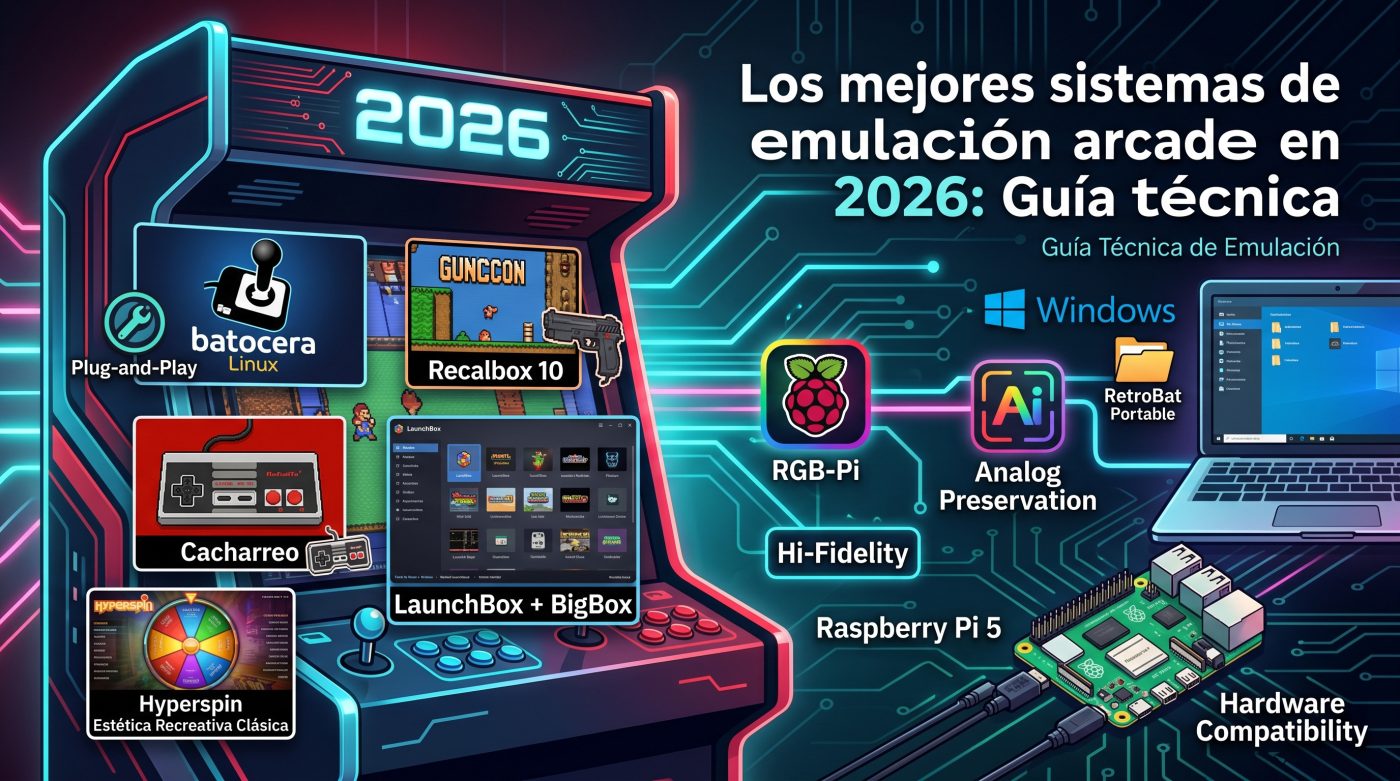
Best Arcade Emulation Systems in 2026: Technical Guide
Jun
The nostalgia of arcade halls, with the unmistakable sound of an “Insert Coin” echoing among flashing lights and wooden cabinets, is more alive than ever in Spain. For developers and enthusiasts looking to restore a classic old cabinet or build a modern one from scratch, choosing the best arcade emulation systems is the most critical step to ensure optimal performance, reviving the glory of achieving the ultimate “high score” without compromising control precision.
The emulation ecosystem has matured notably in 2026. Currently, dedicated operating systems that boot directly on hardware without the mediation of heavy desktop environments coexist with hyper-customized frontends designed for Windows. This analysis thoroughly examines the advantages, drawbacks, compatibilities, and particularities of the main options available on the current market.
Best Arcade Emulation Systems on Standalone Systems
Batocera Linux: Bare-Metal Efficiency and Plug-and-Play Convenience
Batocera Linux has established itself as one of the most efficient options for building a dedicated cabinet free from the distractions of a conventional operating system. By operating independently from a microSD card, USB drive, or solid-state drive, the system drastically reduces resource usage and squeezes every clock cycle out of the processor to deliver optimal performance. Its user interface, based on the EmulationStation engine, offers clean, fluid, and highly attractive navigation.
The system features an excellent integrated metadata scraper that decorates the game library with illustrations, three-dimensional covers, and demo videos with just a couple of clicks from the main menu. However, it presents certain design limitations that advanced users must consider. Batocera is an intentionally closed system by its development team, which prevents installing experimental RetroArch cores or altering the system’s source code directly.
Integration with CRT monitors has also undergone significant technical changes in recent revisions. Since version 33, Batocera uses the Wayland graphics compositor on most of its distributions for single-board computers, which lacks support for the native composite video output of Raspberry Pi boards. Those wishing to use this analog connection must use the legacy v32 version, or resort to active HDMI-to-VGA transcoders that can add a slight input lag.
To configure Batocera with composite video output on a Raspberry Pi (v32), you need to modify the boot/cmdline.txt file by adding parameters such as video=Composite-1:720x480@60ie and adjust config.txt with values such as max_framebuffer_width=320 and enable_tvout=1 using compatible editors that do not corrupt the file. On x86_64 PCs, Batocera’s analog output requires dedicated analog graphics cards, with classic Radeon cards from the HD 3000 series up to the R9 380X being optimal, or Nvidia cards from the GTX 900 series.
Recalbox 10: Analog Preservation, GunCon, and Industrial Use Environments
Recalbox stands out in the retro scene for offering an extremely accessible experience for the general public and perfect synergy with specialized analog display hardware. The distribution is natively compatible with the Raspberry Pi 5, requiring Recalbox 10 onwards (and specifically 10.0.4 for board revisions E or higher). Its startup is immediate, detecting controllers, wireless controllers, and network connections automatically.
One of the most notable innovations of this system is its compatibility with the official Recalbox RGB Dual and Recalbox RGB JAMMA 2 expansion boards. This hardware allows the Raspberry Pi to be coupled directly to the JAMMA connectors of original arcade cabinets, emitting a pixel-perfect analog signal at 15 kHz with a measured latency of less than 0.5 milliseconds.
The Recalbox RGB JAMMA 2 revision introduces outstanding features for restoration professionals. It incorporates native support for Namco GunCon optical guns, compatibility with mechanical or electronic coin counters, and an interlaced display mode (480i) to render high-resolution systems such as Sega Naomi, Atomiswave, or Dreamcast with total sharpness. Additionally, the hardware requires an extremely stable power supply voltage between 5.05V and 5.20V (5.1V recommended) to avoid performance drops under heavy CPU loads.
For management in public exhibition or commercial environments, Recalbox implements the “Gamecenter Mode”, which locks controller shortcuts, starts a pre-selected game by default, requires coins to play, and allows exiting the game only through the physical Service and Test buttons located behind the cabinet’s coin door. It also has a “Kiosk Mode” that completely hides the menu options from the interface to prevent accidental manipulation by users.
Calibration of the horizontal and vertical centering of the analog screen in Recalbox is performed interactively in Libretro-based emulators. By pressing START + B2 during execution, you access the configuration menu to modify the image position and width without needing to alter the cabinet’s physical potentiometers, allowing you to save the adjustments for a single game, system, or globally.
RetroPie and Lakka: The Old School of Tinkering and Lightness
RetroPie represents the historical heritage of emulation on Raspberry Pi boards. Under a solid Debian base, this system gives absolute control to experienced users who enjoy manually editing configuration scripts or implementing experimental cores. Its colossal community and extensive Wiki offer documented solutions for practically any technical anomaly that arises during the assembly of a custom cabinet.
However, it lacks the visual polish and controller automation of its modern competitors, which demands a steep learning curve. On the other hand, Lakka focuses on absolute minimalism by running the RetroArch XMB interface directly on LibreELEC. Although its resource lightness guarantees great performance on modest hardware, its design is austere and its excessive amount of graphical shader options can overwhelm the average player.
Emulation Frontends on Windows: Power and Premium Cataloging
RetroBat: Portability and Speed Without Changing Operating System
For those integrating a conventional x86 computer inside the arcade cabinet, RetroBat is the best free alternative of 2026. This frontend for Windows completely automates the configuration of EmulationStation and organizes a library of more than 100 retro systems through a single portable installer. It can be run directly from an external SSD drive or USB drive on any compatible computer.
The software simplifies integration by automatically downloading the necessary standalone emulators on the first load of a game. RetroBat requires a processor compatible with SSE2, DirectX support, and the installation of Visual C++ redistributable libraries. It is the ideal solution for handheld devices such as the ASUS ROG Ally or the Steam Deck with Windows installed, offering quick shortcuts such as SELECT + START to exit a game or SELECT + X to save progress.
The integrated quick shortcuts in RetroBat’s standard mapping significantly speed up gameplay. By holding down the button assigned as Hotkey (usually SELECT), pressing the D-pad up or down changes the save slot (Save State), while the Y button performs the state load and the X button performs the instant save, optimizing the difficult games of classic arcade boards.
LaunchBox + BigBox: Impeccable Professional-Level Organization
LaunchBox stands out for offering the most refined game database and import engine in the sector. The free desktop version is ideal for organizing immense libraries via mouse and keyboard, but the true arcade magic happens when unlocking the premium BigBox mode for an approximate amount of 48 euros (£40). This full-screen interface mode is optimized for game controllers and televisions, with hundreds of highly polished community themes.
LaunchBox stands out for its compatibility with JAMMA wiring, USB joysticks, trackballs, and even rotary analog selectors. However, this visual sophistication demands a dedicated graphics card and considerable system resources, which can suffer slight slowdowns on low-end equipment with massive game catalogs.
Hyperspin: Classic Arcade Aesthetics for the Most Perfectionist
Hyperspin immediately evokes the golden age of arcade halls with its striking spinning game selection wheel, animated marquee logos, and video previews for each title. It remains one of the most accomplished and authentic aesthetic options on the market, backed by more than 15 years of community development.
Despite its undeniable visual appeal, configuring Hyperspin from scratch constitutes a true “final boss” of computing difficulty. It requires the use of external linking tools such as RocketLauncher to coordinate the underlying emulators, which demands countless hours of manual mapping, code editing, and control calibration. It is mainly recommended for extending pre-configured arcade cabinets or for expert users with great patience.
High-Fidelity Spanish Solutions: The RGB-Pi Ecosystem
In the field of analog hardware, the manufacturer RGB-Pi (Barcelona) has revolutionized the enjoyment of the original RGB signal on CRT screens. Its RGB-Pi 2 board is fully compatible with the Raspberry Pi 5 and offers a 24-bit analog RGB output with professional-standard CSync synchronization. The device integrates directly with the RePlayOS operating system, achieving perfect synchronization of horizontal and vertical frequencies in real time.
However, implementation on the Raspberry Pi 5 carries a crucial technical limitation. Due to the change in audio management via pulse-width modulation (PWM) on pins 12 and 13 of the Pi 5, the analog audio output through the mini-jack integrated on the RGB-Pi 2 board does not emit sound. To solve this inconvenience in Pi 5-based configurations, it is essential to divert sound through external USB audio cards or Bluetooth receivers.
Technical Hardware and Compatibility Comparison
The following table condenses the most relevant data on compatibility, physical performance, and hardware requirements to guide the final installation decision of the best arcade emulation systems in the current gaming environment:
| System / Frontend | Recommended Hardware | CRT Compatibility (15 kHz) | Input Lag | Critical Limitations |
|---|---|---|---|---|
| Batocera Linux | Mini PC x86, RPi 4 / 5 | Medium (Requires AMD cards or advanced scripts) | Medium-Low (Driver dependent) | Wayland prevents native composite video output from v33. |
| Recalbox 10 | RPi 5, RPi 4, Anbernic | Excellent (Native via RGB Dual / JAMMA 2) | Ultra-Low (<0.5 ms measured by hardware) | Requires stable power supplies between 5.05V and 5.20V. |
| RetroBat | Windows PC with integrated or dedicated GPU | Limited (Subject to screen drivers in Windows) | Medium (Affected by Windows processes) | Windows exclusive; requires VC++ and DirectX dependencies. |
| LaunchBox + BigBox | Windows PC with dedicated GPU | Medium (Requires compatible analog converters) | Medium (Affected by the frontend’s graphical environment) | Premium license costing approximately 48 EUR. |
| RGB-Pi + RePlayOS | RPi 4, RPi 5, RPi 3 | Excellent (Native frequency and automatic timings) | Ultra-Low (Hardware synchronization) | No native mini-jack audio output when using a RPi 5. |
Conclusions and Roadmap for Your Arcade Project
The choice of the ideal platform responds directly to the type of screen and control hardware used in the assembly. For original arcade cabinets with analog CRT screens connected through the JAMMA standard, the indisputable option in 2026 is Recalbox 10 paired with the RGB JAMMA 2 module, due to its latency below one millisecond and its dedicated commercial modes. For home users who use televisions with SCART, the RGB-Pi system with RePlayOS ensures the most faithful reproduction of the original pixel art.
On the other hand, if you plan to use a flat LCD monitor or a multifunctional cabinet based on an x86 computer under Windows, the portability and lightness of RetroBat is excellent for reduced budgets. If the absolute priority is the visual presentation of an immense collection and the budget allows acquiring the BigBox license, the LaunchBox environment will provide an unparalleled interactive experience.
Do you already know which one you’ll choose? If you are looking to build your own bartop from scratch or need quality arcade components to complete your project, at OmniRetro you will find everything you need to make the leap from emulation to the real arcade hall.
Frequently Asked Questions (FAQs)
Why doesn’t my RGB-Pi 2 board emit sound when connected to a Raspberry Pi 5?
This is because the Raspberry Pi 5 modified the GPIO pin assignment for PWM audio (relocated to pins 12 and 13). Since these pins coincide with the channels used for RGB signal transmission, the integrated analog jack is disabled, making the use of USB sound cards or Bluetooth mandatory.
Is it possible to use lightguns such as the GunCon in the Recalbox RGB JAMMA 2 system?
Yes, the JAMMA 2 revision of Recalbox incorporates direct hardware support for Namco GunCon optical guns, allowing you to enjoy shooting classics on CRT tube screens without complex configurations.
What minimum voltage requirements does a Raspberry Pi 5 running demanding emulators demand?
The Raspberry Pi 5 and JAMMA 2 module set requires maintaining a stable voltage between 5.05V and 5.20V (5.1V recommended). If the cabinet’s power supply drops under heavy load, a warning will appear on screen, requiring you to slightly adjust the power supply’s potentiometer with insulated safety tools.
What advantage does RetroBat’s “portable” folder system have in Windows environments?
RetroBat’s portability lies in the fact that it stores emulators, configurations, metadata, and games in a single autonomous directory. This allows you to copy the entire folder to an external SSD drive and run it on laptops, living room computers, or handheld consoles without needing to reinstall software or alter the host operating system.
Sources and Recommended Reading
- Official project changelog at Batocera.linux
- Technical documentation and scripting guides on the Official Batocera Wiki
- Development issue repository on GitHub Batocera-Linux
What has been your experience integrating these operating systems into your retro restoration projects? Are you on the analog CRT 15 kHz team or do you prefer the digital convenience of current LCD panels? Leave your comment below sharing your configurations and debating with the community of arcade world enthusiasts!