
 Español
 Français
 Deutsch
 Italiano
 Português

 Mega Packs
 Arcade Cabinet Kits
 Vinyls
 Monitors
 Arcade Stools
 Arcade Components
 T-Molding and U-Molding
 Gaming furniture
 Outlet
Emulators
Save Games, Cheats and RetroAchievements on Your Arcade Machine
Nov
On a real arcade machine, the game ended when the power went off, and it often took the high score table with it. On your arcade machine running Batocera or RetroBat, you can save your game at any moment, keep your high scores, activate cheats and earn achievements with RetroAchievements. And it is all done with the joystick and buttons.
In this guide we explain how to save and load with the buttons, where the files end up, how to use cheats and how achievements work in arcade games. The information comes from the Batocera and RetroBat wikis, the Batocera 43.1 code, the libretro documentation and the RetroAchievements documentation, all consulted on 12 November 2026.
Savestates and saved games: they are not the same thing
- A savestate is a snapshot of the whole machine at a given moment. The emulator makes it whenever you like, even if the game has no save feature. When you load it, you go back to exactly that point.
- A saved game is the one made by the game itself: the console’s memory, the memory card or, on arcade machines, the NVRAM of the board, where some games stored their settings and high scores.
The difference matters for one reason: according to the RetroBat wiki, savestates often stop working when the emulator is updated, and the FinalBurn Neo documentation says they are only guaranteed to keep working if you never update the core. That is why both recommend using the game’s own save first when it has one.
Saving and loading with the controller
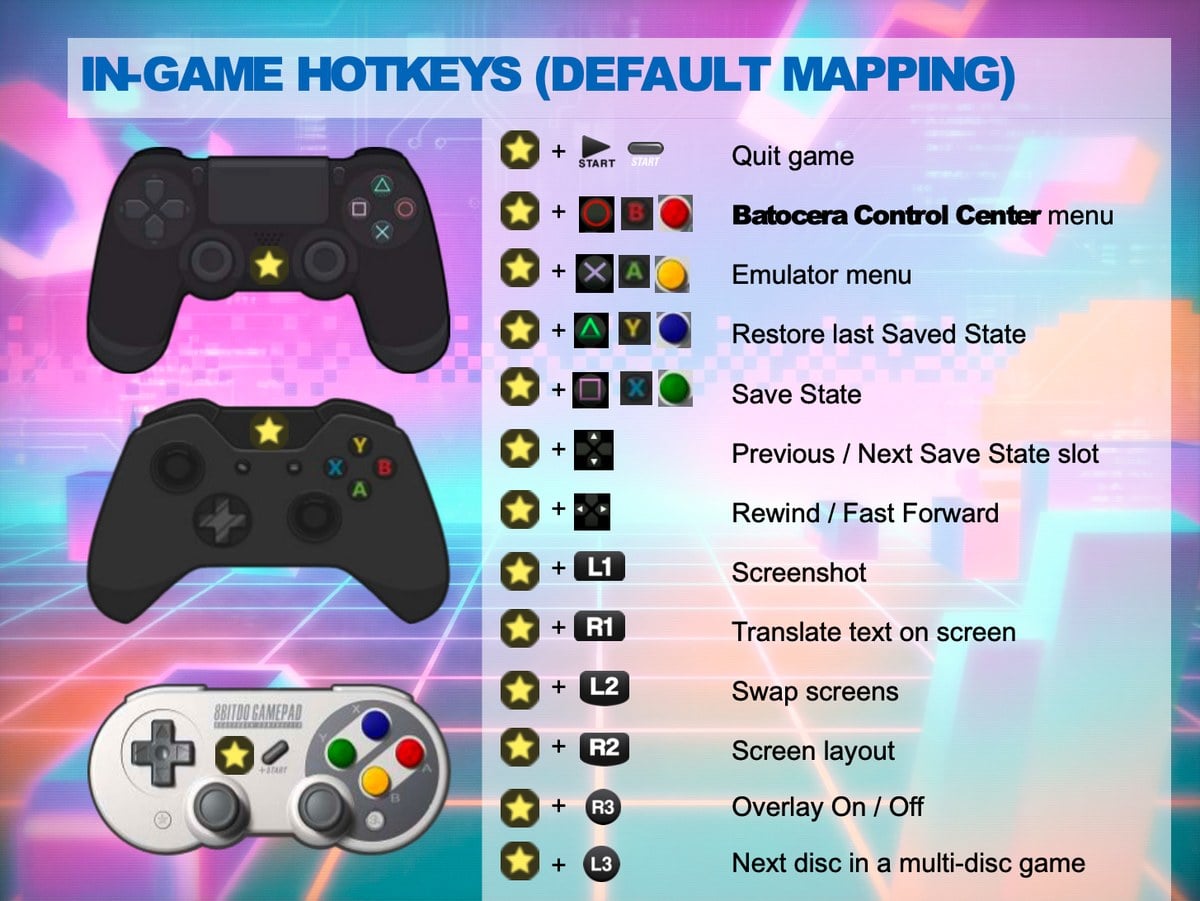
Everything works with the HOTKEY button: you hold it down on the player 1 controller and press another button. In Batocera and in RetroBat, the save and load combinations are the same:
- HOTKEY + west button (the one that would be Y on a Super Nintendo controller): saves.
- HOTKEY + north button (X on a Super Nintendo): loads.
- HOTKEY + up or down on the joystick: changes slot.
- HOTKEY + START: exits the game.
In RetroBat, HOTKEY is the SELECT button unless you choose another. On an arcade button panel, it is usually the coin button or one you have free; we explain how to choose it in Setting up your arcade machine controls.
A warning if you use standalone MAME in Batocera: there, these combinations use MAME’s quick save, and the EmulationStation savestate manager does not show it.
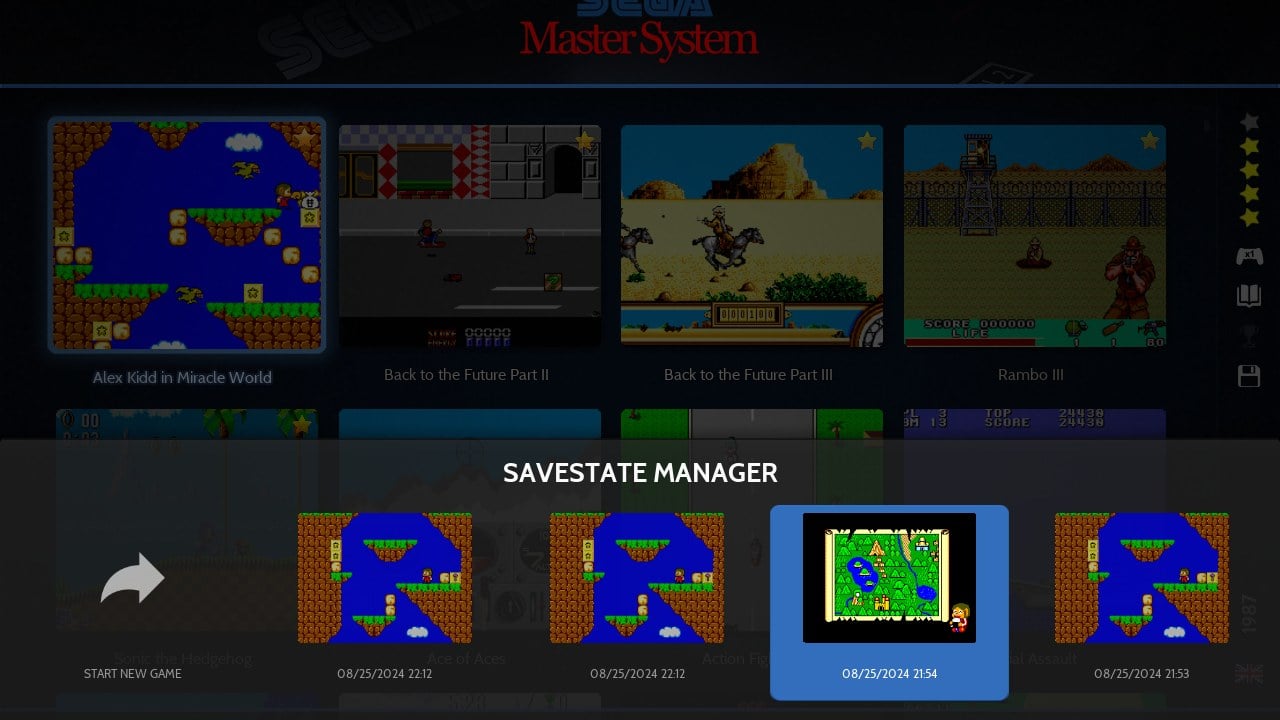
The savestate manager
Both systems have a manager with thumbnails so you can go back to a saved game from the menu:
- In Batocera it appears when you hold down on the game in the list. In GAME SETTINGS, under SAVESTATES, you can make it appear every time the game launches, turn on automatic saving and loading (AUTO SAVE/LOAD) and choose whether each save takes up a new slot. In Batocera 43.1, this last option is switched on.
- In RetroBat it opens with the north button on the game. It has the same options in GAME SETTINGS, and games with savestates have an icon in the list.
Where the files end up
In Batocera, in /userdata/saves/, with one folder per system (for example, /userdata/saves/fbneo/). In RetroBat, in the saves folder, also by system and emulator. If you want to make a backup, that is the folder you need to keep.
Arcade high scores
Many boards wiped the high score table when they were switched off. Emulators fix this with a file, hiscore.dat, which tells them which part of the memory to save for each game:
- FinalBurn Neo saves them by default with the Hiscores option, and Batocera already includes its file.
- MAME 2003-Plus also saves them by default, with its own file.
- Standalone MAME saves them with its high score plugin. In Batocera 43.1 it is switched on; in RetroBat you need to switch it on.
It does not work in every game: the FinalBurn Neo documentation warns that some lack support.
Cheats
There are several ways, depending on the emulator:
- FinalBurn Neo cheats: the project has its own collection, with around 3,400 cheat files. They are activated in the emulator menu (HOTKEY + south button), in the core options, under Cheat. This is the option recommended by the FinalBurn Neo documentation, and you need to activate them again every time you start the game.
- RetroArch cheats: they are in the same menu, under Cheats. For arcade games there are far fewer: the libretro database has 72 files for FinalBurn Neo.
- MAME: uses its own cheat files. Batocera starts standalone MAME with cheats activated; in RetroBat you need to activate them in the options.
Batocera does not include cheats by default: they can be installed from its content downloader.
RetroAchievements: achievements in retro games
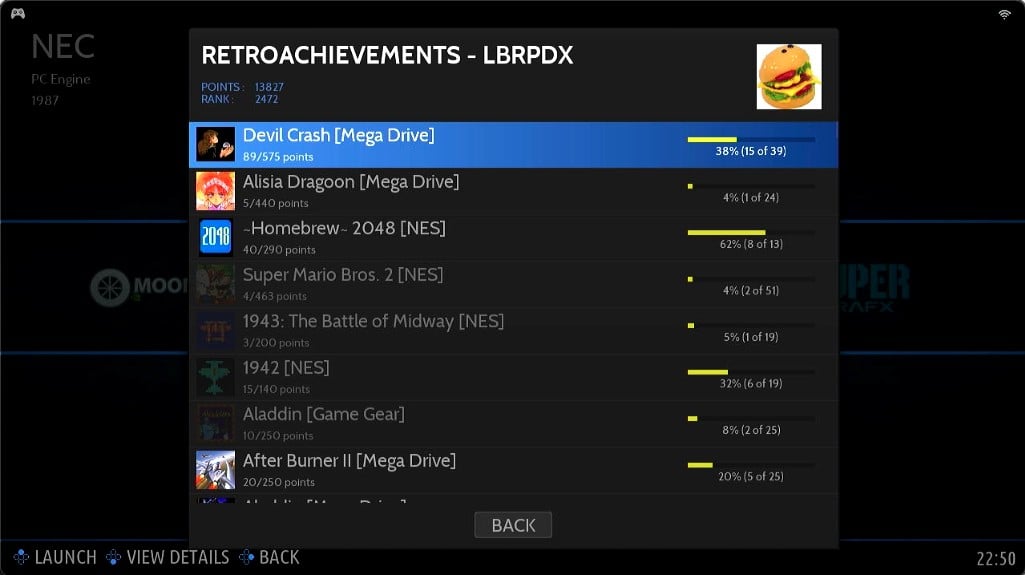
RetroAchievements adds achievements to classic games, like those on current consoles. The account is free and an internet connection is required.
- In Batocera: in GAME SETTINGS, under RETROACHIEVEMENT SETTINGS, you turn it on and enter your username and password.
- In RetroBat: in MAIN MENU, GAME SETTINGS and RETROACHIEVEMENTS SETTINGS, the same. You only need to log in once and RetroBat uses it in all compatible emulators.
On arcade games, only with FinalBurn Neo
This is the point that causes the most confusion. According to the official RetroAchievements list, on arcade games it only works with FinalBurn Neo, plus Flycast for Naomi and Atomiswave. The Batocera wiki makes it clear: it does not work with any version of MAME.
And in Batocera 43.1, the mame folder uses MAME 2003-Plus by default. If you want achievements in your arcade games, they need to be in the fbneo folder, or you need to change the emulator for that game to FinalBurn Neo. When you hold down on a game in the list, Batocera shows you which core it uses and which one is compatible with achievements.
Another detail: on arcade games, RetroAchievements recognises the game by its file name, not by its contents. If you rename the zip, there are no achievements.
Hardcore mode
This is the demanding mode: according to the RetroAchievements FAQ, it does not let you load savestates, use cheats or rewind. In return, it is the only one that counts for the leaderboards. In FinalBurn Neo, it also does not accept patched games. Batocera turns it off automatically when you play online.
Rewind
Rewind lets you go back a few seconds after a mistake (HOTKEY + left). To do this, the emulator continuously saves a savestate in memory, and RetroArch warns that this costs quite a lot of performance. That is why it is switched off in Batocera and RetroBat, and in its automatic mode RetroBat deliberately leaves out MAME and FinalBurn Neo arcade games. In Batocera it is activated in GAME SETTINGS, under REWIND.
On a Raspberry Pi, if you notice stuttering or lag when you turn it on, it is the first thing to switch off. It is also best not to combine it with run-ahead: we explain it in Input lag on your arcade machine.
And what if my machine has a Pandora?
All of this applies to Batocera and RetroBat, which run on a Raspberry Pi or a mini PC. If you are still choosing, in What System to Choose for Your Arcade Machine? we compare the options, and in Installing Batocera on your arcade machine we explain how to get started.
Frequently asked questions
How do I save my game in an arcade game?
With HOTKEY + west button, and you load it with HOTKEY + north button.
Why am I not getting achievements in an arcade game?
Most likely the game is running with MAME. They need to run with FinalBurn Neo, and without renaming the file.
Are savestates lost when updating Batocera?
They may stop working if the emulator is updated. The game’s own saves and high scores usually stay valid.
Can I use cheats with RetroAchievements?
In normal mode, yes. In hardcore mode, no.
Sources
Consulted on 12 November 2026:
- Batocera wiki: shortcuts, savestate manager, RetroAchievements and arcade guide.
- Batocera 43.1 code on GitHub.
- RetroBat wiki: savestates, shortcuts and RetroAchievements.
- Libretro documentation: FinalBurn Neo and cheats.
- FinalBurn Neo cheats and libretro cheat database, on GitHub.
- RetroAchievements: FAQ, supported emulators and game identification.
- MAME documentation: high score plugin.